
 Hourly Consulting
 Maintenance
 Training
 Implementation
 Microsoft Power Pages
 D365 & Power Platform
 Websites & Web Applications
 Blog
Blog
 Power Pages Tips
 Portals Community Call

Power Pages: Bulk Edit Interface Using Forms
 Nicholas Hayduk
September 14, 2026
5 Min.To Read
Nicholas Hayduk
September 14, 2026
5 Min.To Read
In my last post, I covered a technique to allow users to bulk edit records from a List that used custom code to create the editing experience. But Power Pages has a built-in way to allow users to edit data – Forms. So let’s look at if we can use those to define our bulk edit experience.
Category:
The Approach
If you configure the ability to edit the row of a List via a modal, you’ll be presented with a Power Pages Form in a popup. The idea with this post is to replicate that experience, but for bulk edit.
As with our last post, I’m going to use AI to help with the heavy lifting.
The Implementation
In this case, instead of using the Copilot in VS Code for Web with Power Pages, I went straight to ChatGPT to see how it would handle Power Pages development on its own. For those wondering why ChatGPT and not Claude, I have a paid ChatGPT license because most of my day isn’t spent on development tasks, and so I find ChatGPT to be the best tool for my day-to-day work. My colleagues here at Engineered Code that focus more on development are using Claude as their primary tool.
Here is the prompt I tried:
provide me with javascript for a power pages site that accepts an array of ids as a parameter and a basic form id, which then displays that basic form in a bootstrap modal popup. when the form is submitted, use javascript to get the values from the form fields and use the power pages web api to update the fields for all of the rows whose ids were provided as inputs.The output was decent, but I could tell right away that there was an improvement that I wanted to make.
Iterating with AI
The first version that ChatGPT gave me involved adding the Form to the page by using Liquid and putting it in a hidden container. I had envisioned instead to mirror the IFrame method used by the List functionality, which I talked about in a previous blog post.
So I asked ChatGPT about that, and it updated the code to do that instead (and it referenced my own blog post as part of its answer).
Overall the code it produced was pretty good. It called the Web API using the proper methods. It handles the more common data types (text, numbers, choices), and ChatGPT did highlight some of the data types that this code does not support, such as lookups.
I then took this code (which I’ll include at the bottom of this post), and replaced the code from my last post that I had added to a Web Template.
Combining the New Code with the Multiselect List Code
To make use of this code, I updated the $(document).ready function from my last post by changing the call to the showBulkEditModal (which now takes different parameters):
showBulkEditModal(
    Object.keys(selectedRows),
    "1ee711b5-4b65-497b-b4e4-060d1cc6ee27", // the ID of my form
    "contacts"
);
The ID is the ID of the Entity Form (aka Basic Form) row in Dataverse that you need to create. Whatever fields you put on the form will be editable, assuming the data types are supported by the code produced by ChatGPT. The Form should be set to Insert/Creates a new record mode.
Make sure you’ve setup the Web API and Table Permissions, as mentioned in the last post. Also, any of the potential improvements suggested in the last post would also apply here.
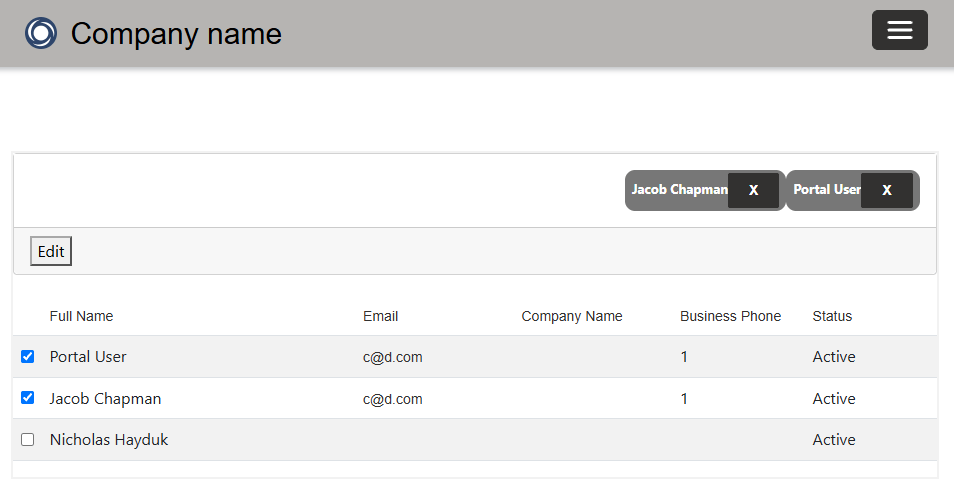
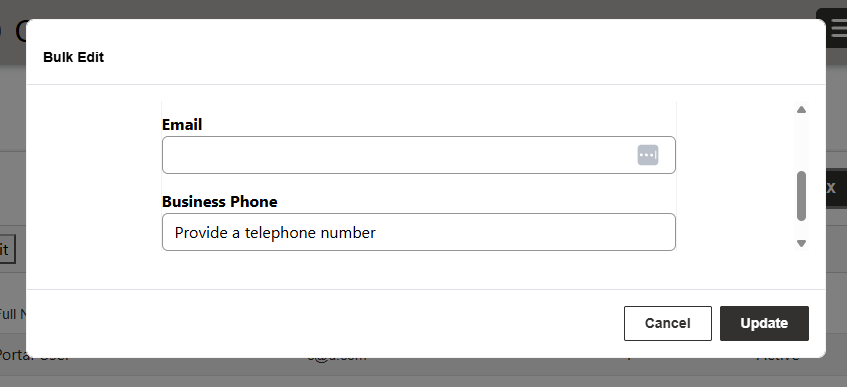
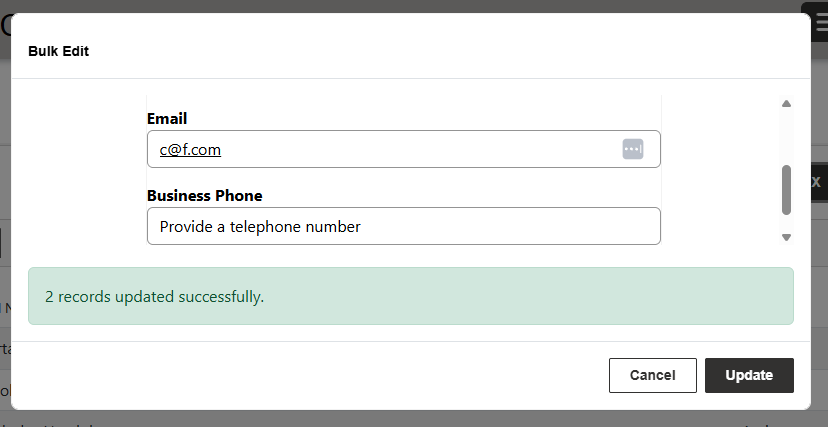
The One Big Gotcha
In order for this to work, users need the ability to create rows on the table they are trying to edit.
This isn’t because they actually create rows as part of this process, but because we want to render a blank form for the user to enter their bulk edits. The easiest way to do that is to use the Insert/Creates a new record mode.
Power Pages is smart enough not to load a form that the user wouldn’t have the permission to use. So if users can’t create new rows, the IFrame will not display the form – you’ll see a permissions error instead.
You could potentially use the Edit mode, but you’d need to clear out the values first before letting the user edit them.
Bulk Edit Interface Code
(function (webapi, $) {
    function safeAjax(ajaxOptions) {
        var deferredAjax = $.Deferred();

        shell.getTokenDeferred().done(function (token) {
            ajaxOptions.headers = ajaxOptions.headers || {};
            ajaxOptions.headers["__RequestVerificationToken"] = token;

            $.ajax(ajaxOptions)
                .done(function (data, textStatus, jqXHR) {
                    validateLoginSession(data, textStatus, jqXHR, deferredAjax.resolve);
                })
                .fail(deferredAjax.reject);
        }).fail(function () {
            deferredAjax.rejectWith(this, arguments);
        });

        return deferredAjax.promise();
    }

    webapi.safeAjax = safeAjax;
})(window.webapi = window.webapi || {}, jQuery);


function showBulkEditModal(recordIds, basicFormId, entitySetName) {
    if (!Array.isArray(recordIds) || recordIds.length === 0) {
        console.error("No record IDs were supplied.");
        return;
    }

    $("#bulkEditModal").remove();

    var modalHtml =
        '<div class="modal fade" id="bulkEditModal" tabindex="-1" aria-labelledby="bulkEditModalLabel" aria-hidden="true">' +
            '<div class="modal-dialog modal-lg">' +
                '<div class="modal-content">' +
                    '<div class="modal-header">' +
                        '<h5 class="modal-title" id="bulkEditModalLabel">Bulk Edit</h5>' +
                        '<button type="button" class="btn-close" data-bs-dismiss="modal" aria-label="Close"></button>' +
                    '</div>' +
                    '<div class="modal-body">' +
                        '<div id="bulkEditLoading" class="text-center py-4">' +
                            '<div class="spinner-border" role="status"><span class="visually-hidden">Loading...</span></div>' +
                        '</div>' +
                        '<iframe id="bulkEditFrame" style="width:100%; border:0; display:none;" title="Bulk Edit Form"></iframe>' +
                        '<div id="bulkEditStatus" class="mt-3" aria-live="polite"></div>' +
                    '</div>' +
                    '<div class="modal-footer">' +
                        '<button type="button" class="btn btn-secondary" data-bs-dismiss="modal">Cancel</button>' +
                        '<button type="button" class="btn btn-primary" id="bulkEditSubmit" disabled>Update</button>' +
                    '</div>' +
                '</div>' +
            '</div>' +
        '</div>';

    $("body").append(modalHtml);

    var modalElement = document.getElementById("bulkEditModal");
    var iframe = document.getElementById("bulkEditFrame");

    var modal = new bootstrap.Modal(modalElement, {
        backdrop: "static",
        keyboard: false
    });

    // Power Pages built-in modal form endpoint.
    // This JavaScript must be somewhere Liquid is processed.
    var formUrl =
        "/_portal/modal-form-template-path/{{ website.id }}" +
        "?entityformid=" + encodeURIComponent(basicFormId) +
        "&languagecode=1033";

    iframe.addEventListener("load", function () {
        var $frame = $(iframe).contents();

        // Hide the normal Basic Form action buttons because we're
        // performing the updates ourselves.
        $frame.find(".actions, .form-action-container").hide();

        // Prevent the form itself from submitting normally.
        $frame.find("form").on("submit.bulkEdit", function (e) {
            e.preventDefault();
            return false;
        });

        resizeBulkEditIframe();

        $("#bulkEditLoading").hide();
        $("#bulkEditFrame").show();
        $("#bulkEditSubmit").prop("disabled", false);
    });

    $("#bulkEditSubmit").on("click", function () {
        var frameWindow = iframe.contentWindow;
        var $frame = $(iframe).contents();

        // Run Power Pages / ASP.NET validators inside the iframe.
        if (typeof frameWindow.Page_ClientValidate === "function") {
            frameWindow.Page_ClientValidate();

            if (frameWindow.Page_IsValid === false) {
                resizeBulkEditIframe();
                return;
            }
        }

        var values = getBulkEditFormValues($frame);

        if (Object.keys(values).length === 0) {
            $("#bulkEditStatus").html(
                '<div class="alert alert-warning mb-0">Enter at least one value to update.</div>'
            );
            return;
        }

        $("#bulkEditSubmit").prop("disabled", true).text("Updating...");
        $("#bulkEditStatus").html(
            '<div class="alert alert-info mb-0">Updating ' + recordIds.length + ' records...</div>'
        );

        var completed = 0;
        var succeeded = 0;
        var failed = 0;

        recordIds.forEach(function (id) {
            webapi.safeAjax({
                type: "PATCH",
                url: "/_api/" + entitySetName + "(" + cleanGuid(id) + ")",
                contentType: "application/json",
                headers: {
                    "Accept": "application/json",
                    "OData-MaxVersion": "4.0",
                    "OData-Version": "4.0"
                },
                data: JSON.stringify(values)
            })
            .done(function () {
                succeeded++;
            })
            .fail(function (xhr) {
                failed++;
                console.error("Bulk edit failed for " + id, xhr);
            })
            .always(function () {
                completed++;

                if (completed === recordIds.length) {
                    bulkEditComplete(succeeded, failed);
                }
            });
        });
    });

    function bulkEditComplete(succeeded, failed) {
        var message =
            succeeded + " record" + (succeeded === 1 ? "" : "s") +
            " updated successfully.";

        if (failed > 0) {
            message += " " + failed + " record" +
                (failed === 1 ? "" : "s") + " failed.";
        }

        $("#bulkEditStatus").html(
            '<div class="alert ' +
            (failed ? "alert-warning" : "alert-success") +
            ' mb-0">' + message + "</div>"
        );

        $("#bulkEditSubmit").prop("disabled", false).text("Update");
    }

    function resizeBulkEditIframe() {
        try {
            var height = $(iframe).contents().find("body").outerHeight(true);
            if (height) $(iframe).height(height + 20);
        } catch (e) {
            console.warn("Could not resize bulk edit iframe.", e);
        }
    }

    modalElement.addEventListener("hidden.bs.modal", function () {
        modal.dispose();
        modalElement.remove();
    });

    iframe.src = formUrl;
    modal.show();
}


function getBulkEditFormValues($frame) {
    var values = {};

    $frame.find("#EntityFormControl input, #EntityFormControl select, #EntityFormControl textarea")
        .each(function () {
            var $field = $(this);
            var name = $field.attr("id");
            var type = ($field.attr("type") || "").toLowerCase();

            if (!name) return;
            if ($field.prop("disabled")) return;
            if (["hidden", "button", "submit", "reset", "file"].includes(type)) return;
            if (name.indexOf("__") === 0) return;

            var value;

            if (type === "radio") {
                if (!$field.prop("checked")) return;
                value = $field.val();
            } else if (type === "checkbox") {
                // Only include a checkbox if the user has actually selected it.
                // See note below regarding two-option fields.
                if (!$field.prop("checked")) return;
                value = true;
            } else {
                value = $field.val();

                // Blank = don't change this Dataverse column.
                if (value === "" || value === null || value === undefined) return;
            }

            if ($field.is("select") && value !== "" && !isNaN(value)) {
                value = Number(value);
            }

            if (type === "number") {
                value = Number(value);
            }

            values[name] = value;
        });

    return values;
}


function cleanGuid(id) {
    return id.replace(/[{}]/g, "");
}
