
 Hourly Consulting
 Maintenance
 Training
 Implementation
 Microsoft Power Pages
 D365 & Power Platform
 Websites & Web Applications
 Blog
Blog
 Power Pages Tips
 Portals Community Call

Power Pages: Bulk Edit Interface Using Custom Code
 Nicholas Hayduk
August 31, 2026
6 Min.To Read
Nicholas Hayduk
August 31, 2026
6 Min.To Read
Summer was busy both personally and professionally, so I’m a bit behind in my blog posts, but I hope to make up for that over the next few weeks. In our last post, I demonstrated one way to create a multiselect interfact for a list, which is the first step in the process of creating bulk edit capabilities. In this post, we’ll look at a simple way to create an interface to capture the bulk edits.
Category:
The Approach
My approach in this post is to use custom code to display a modal popup that displays a form with a list of fields that, once saved, will use the Web API to update all of the selected rows.
In the olden days, I would’ve sat down for a few hours and written some code. That time has passed. Instead, I of course used AI to build it out for me.
The Implementation
I started by using the Copilot available in the VS Code for Web integration with Power Pages. I figured that this AI tool would know best how to work with Power Pages.
I create a new environment, since my typical environment for playing around is in the Canadian data center, and the Copilot for Power Pages doesn’t yet work in Canada.
With that sorted out, here is the prompt I used:
provide me with javascript for a power pages site that accepts an array of ids as a parameter, table name and a list of editable fields, which then displays a form in a bootstrap modal popup. the form should allow the user to enter a value for each of the editable fields passed as a parameter. when the form is submitted, use the power pages web api to update the fields for all of the rows whose ids were provided as inputs. provide a sample invocation of the function that allows the user to update the business phone and email address of a contactIt generated some code that at first glance looked OK. However, upon further inspection, there were a couple of glaring problems.
Iterating with AI
First, it used the old version of Bootstrap. The Copilot in Power Pages thinks that you need to use version 3. Even after further prompts, it would not use version 5.
Secondly, it didn’t properly invoke the Power Pages Web API. It didn’t use the safeAjax function that is standard with Power Pages to properly include the Request Verification Token.
So the Copilot in Power Pages was a good start, but I then quickly moved over to ChatGPT. I asked it to convert to Bootstrap v5, and to call the Web API appropriately, and it did it with ease. It also added support for multiple field types (like numbers, dates, choices, and booleans).
I then took this code (which I’ll include at the bottom of this post), and added it to a Web Template on my site.
Combining the New Code with the Multiselect List Code
To make use of this code, I updated the $(document).ready function from my last post by adding this to the end:
$("<div class='card-footer'></div>").append($("<button type='button'>Edit</button>").on('click', function() {
	showBulkEditModal(Object.keys(selectedRows), 'contacts', [
		{ name: 'telephone1', label: 'Business Phone' },
		{ name: 'emailaddress1', label: 'Email Address', type: 'email' },
		{ name: 'numberofchildren', label: 'Number of Children', type: 'number' },
		{ name: 'birthdate', label: 'Birthday', type: 'date' },
		{ name: 'creditonhold', label: 'Credit Hold', type: 'boolean' },
		{
			name: 'preferredcontactmethodcode',
			label: 'Preferred Contact Method',
			type: 'choice',
			options: [
				{ value: 1, label: 'Any' },
				{ value: 2, label: 'Email' },
				{ value: 3, label: 'Phone' },
				{ value: 4, label: 'Fax' },
				{ value: 5, label: 'Mail' }
			]
		}
	]);
})).appendTo(selectedCard);
This adds an Edit button to the card that displays all of the selected rows, that, when clicked, calls the new code I’ve created, including a definition of which fields should be editable.
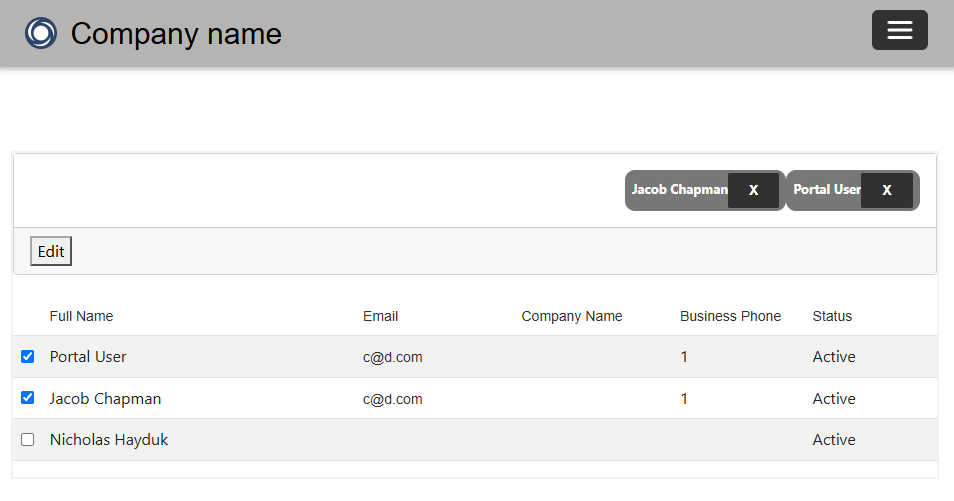
I also added a Liquid include statement at the end to include the Web Template I just created.
Finally, I enabled the Web API for the table, being sure not to use the * for the fields configuration, as that has been deprecated. And if you didn’t already have it, you need the Write Table Permissions setup on your table.
With all of that in place, I’ve now got a simple bulk edit interface for classic Power Pages lists.
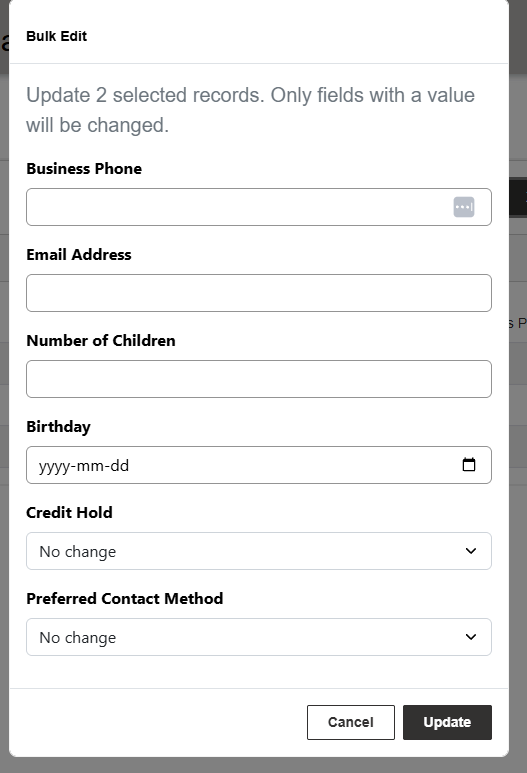
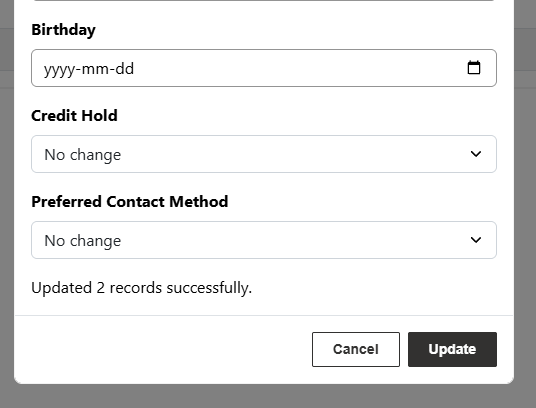
As is typical with my blog posts, the following code works, but probably still has some gaps to make it truly production ready. Some areas that you might want to improve for a more robust implementation:
- Limiting the number of records that can be bulk edited. For example, you might want to limit it to 10 or 20 records to ensure that you don’t hit any service protection limits.
- You might want to improve the behavior after a successful update. Right now it is a simple message saying how may rows were updated or failed. Also, you should probably let the user know to refresh the page, as there isn’t a clean way to refresh the List after the bulk update has been made.
Bulk Edit Interface Code
// Power Pages safe AJAX wrapper
(function (webapi, $) {
    function safeAjax(ajaxOptions) {
        var deferredAjax = $.Deferred();

        shell.getTokenDeferred().done(function (token) {
            ajaxOptions.headers = ajaxOptions.headers || {};
            ajaxOptions.headers["__RequestVerificationToken"] = token;

            $.ajax(ajaxOptions)
                .done(function (data, textStatus, jqXHR) {
                    validateLoginSession(data, textStatus, jqXHR, deferredAjax.resolve);
                })
                .fail(deferredAjax.reject);
        }).fail(function () {
            deferredAjax.rejectWith(this, arguments);
        });

        return deferredAjax.promise();
    }

    webapi.safeAjax = safeAjax;
})(window.webapi = window.webapi || {}, jQuery);


// Function to show a modal form for bulk editing Dataverse records
function showBulkEditModal(recordIds, tableName, editableFields) {
    $('#bulkEditModal').remove();

    var formFieldsHtml = '';

    editableFields.forEach(function (field) {
        var inputId = 'edit_' + field.name;
        var fieldType = field.type || 'text';

        formFieldsHtml +=
            '<div class="mb-3">' +
                '<label for="' + inputId + '" class="form-label">' + field.label + '</label>';

        switch (fieldType) {
            case 'number':
                formFieldsHtml += '<input type="number" class="form-control" id="' + inputId + '" name="' + field.name + '">';
                break;

            case 'email':
                formFieldsHtml += '<input type="email" class="form-control" id="' + inputId + '" name="' + field.name + '">';
                break;

            case 'date':
                formFieldsHtml += '<input type="date" class="form-control" id="' + inputId + '" name="' + field.name + '">';
                break;

            case 'boolean':
                formFieldsHtml +=
                    '<select class="form-select" id="' + inputId + '" name="' + field.name + '">' +
                        '<option value="">No change</option>' +
                        '<option value="true">Yes</option>' +
                        '<option value="false">No</option>' +
                    '</select>';
                break;

            case 'choice':
                formFieldsHtml +=
                    '<select class="form-select" id="' + inputId + '" name="' + field.name + '">' +
                        '<option value="">No change</option>';

                (field.options || []).forEach(function (option) {
                    formFieldsHtml += '<option value="' + option.value + '">' + option.label + '</option>';
                });

                formFieldsHtml += '</select>';
                break;

            default:
                formFieldsHtml += '<input type="text" class="form-control" id="' + inputId + '" name="' + field.name + '">';
        }

        if (field.helpText) {
            formFieldsHtml += '<div class="form-text">' + field.helpText + '</div>';
        }

        formFieldsHtml += '</div>';
    });


    var modalHtml =
        '<div class="modal fade" id="bulkEditModal" tabindex="-1" aria-labelledby="bulkEditModalLabel" aria-hidden="true">' +
            '<div class="modal-dialog">' +
                '<div class="modal-content">' +
                    '<div class="modal-header">' +
                        '<h5 class="modal-title" id="bulkEditModalLabel">Bulk Edit</h5>' +
                        '<button type="button" class="btn-close" data-bs-dismiss="modal" aria-label="Close"></button>' +
                    '</div>' +
                    '<div class="modal-body">' +
                        '<p class="text-muted">Update ' + recordIds.length + ' selected record' + (recordIds.length === 1 ? '' : 's') + '. Only fields with a value will be changed.</p>' +
                        '<form id="bulkEditForm" autocomplete="off">' + formFieldsHtml + '</form>' +
                        '<div id="bulkEditStatus" class="visually-hidden" aria-live="polite"></div>' +
                    '</div>' +
                    '<div class="modal-footer">' +
                        '<button type="button" class="btn btn-secondary" data-bs-dismiss="modal">Cancel</button>' +
                        '<button type="button" class="btn btn-primary" id="bulkEditSubmit">Update</button>' +
                    '</div>' +
                '</div>' +
            '</div>' +
        '</div>';

    $('body').append(modalHtml);

    var modalElement = document.getElementById('bulkEditModal');
    var bulkEditModal = new bootstrap.Modal(modalElement, {
        backdrop: 'static',
        keyboard: false
    });

    modalElement.addEventListener('shown.bs.modal', function () {
        var firstField = modalElement.querySelector('.form-control, .form-select');
        if (firstField) firstField.focus();
    });

    modalElement.addEventListener('hidden.bs.modal', function () {
        bulkEditModal.dispose();
        modalElement.remove();
    });

    bulkEditModal.show();


    $('#bulkEditSubmit').off('click').on('click', function () {
        var values = {};

        editableFields.forEach(function (field) {
            var fieldType = field.type || 'text';
            var val = $('#edit_' + field.name).val();

            if (val === undefined || val === null || val === '') return;

            switch (fieldType) {
                case 'number':
                    values[field.name] = Number(val);
                    break;
                case 'boolean':
                    values[field.name] = val === 'true';
                    break;
                case 'choice':
                    values[field.name] = Number(val);
                    break;
                default:
                    values[field.name] = val;
            }
        });

        if (Object.keys(values).length === 0) {
            $('#bulkEditStatus')
                .text('Please enter at least one value to update.')
                .removeClass('visually-hidden');
            return;
        }

        $('#bulkEditStatus').text('Updating records...').removeClass('visually-hidden');
        $('#bulkEditSubmit').prop('disabled', true).text('Updating...');

        var updateCount = 0;
        var errorCount = 0;
        var total = recordIds.length;

        function updateComplete() {
            if (updateCount + errorCount !== total) return;

            var statusMessage = 'Updated ' + updateCount + ' record' +
                (updateCount === 1 ? '' : 's') + ' successfully.';

            if (errorCount > 0) {
                statusMessage += ' ' + errorCount + ' record' +
                    (errorCount === 1 ? '' : 's') + ' failed.';
            }

            $('#bulkEditStatus').text(statusMessage).removeClass('visually-hidden');
            $('#bulkEditSubmit').prop('disabled', false).text('Update');
        }

        recordIds.forEach(function (id) {
            webapi.safeAjax({
                type: 'PATCH',
                url: '/_api/' + tableName + '(' + id + ')',
                contentType: 'application/json',
                headers: {
                    'Accept': 'application/json',
                    'OData-MaxVersion': '4.0',
                    'OData-Version': '4.0'
                },
                data: JSON.stringify(values)
            })
            .done(function () {
                updateCount++;
                updateComplete();
            })
            .fail(function (xhr) {
                errorCount++;
                console.error('Error updating record ' + id, xhr);
                updateComplete();
            });
        });
    });
}
